Export Service

Account and access platform for Australia's export industry. I led end-to-end design serving 2,000+ regulated businesses, reducing registration times and simplifying compliance.

Client
Department of Agriculture, Fisheries and Forestry (DAFF)
Timeline
2022–2025
Export Service

Overview

Australia's export industry depends on government certification at every step. But the systems exporters used to manage that relationship were fragmented across multiple departments, each with its own login, its own forms and no shared view of status. For the 2,000+ businesses that rely on timely approvals, delays meant cargo sitting in port.

A centralised platform was needed, but consolidating protected business data and replacing legacy systems introduced real security challenges. The core tension throughout this project was balancing security requirements with usability.

What we built

The Export Service provides a single platform for exporters to manage documentation and regulatory obligations. Users can onboard, set communication preferences, verify business authorisations, manage staff permissions, update account details and track application status, streamlining previously fragmented workflows.

Role

I was design lead on a 16-person delivery team for three years, reporting to the Director of Digital Identity and Account. I owned the end-to-end design process, from early wireframes tested with exporters through to production specifications built within the Agriculture Design System.

I shaped the product roadmap through research. Usability findings directly influenced which features were prioritised across quarters. I worked with business analysts to map complex journeys, with content designers to translate regulatory language into plain English and with developers to resolve implementation gaps in the Azure B2C authentication layer.

I delivered responsive, WCAG 2.1 conforming interfaces aligned to the Digital Service Standard and contributed new components back to the Agriculture Design System.
Top

Challenges

This project operated within several layers of government requirements. All interfaces had to conform to WCAG 2.1 AA, the Digital Service Standard and the Information Security Manual including Essential Eight security controls.

The authentication UI had to be built in HTML and CSS because Azure B2C (the white-label authentication solution) couldn't use the Design System's React component library. This meant creating detailed design documentation and working closely with developers to maintain visual consistency and accessibility without our usual tooling.

Business verification required integration with the Relationship Authorisation Manager (RAM), a whole-of-government service. The linking process involved multiple redirects between government applications, which could easily disorient users.

Top

Designing for efficiency and clarity

Users needed a way to avoid repetitive data entry. Guided by the government principle of 'tell us once', the account enables centralised profile management. Details entered once are reused seamlessly across forms and system integrations.

Before committing to code, I used the department's Agriculture Design System to create Figma prototypes for concept validation and testing. Because business units manage relationships with exporters, we began by validating early concepts with them.

Next, we developed a research script and ran moderated usability sessions with exporters to gather feedback. Participants were recruited through Askable, giving us direct access to real users and ensuring insights reflected actual user needs.

Navigation

Users managing a single business didn't need a context switcher cluttering their interface, but users managing five entities needed to change context constantly. The challenge was supporting both without compromising either.

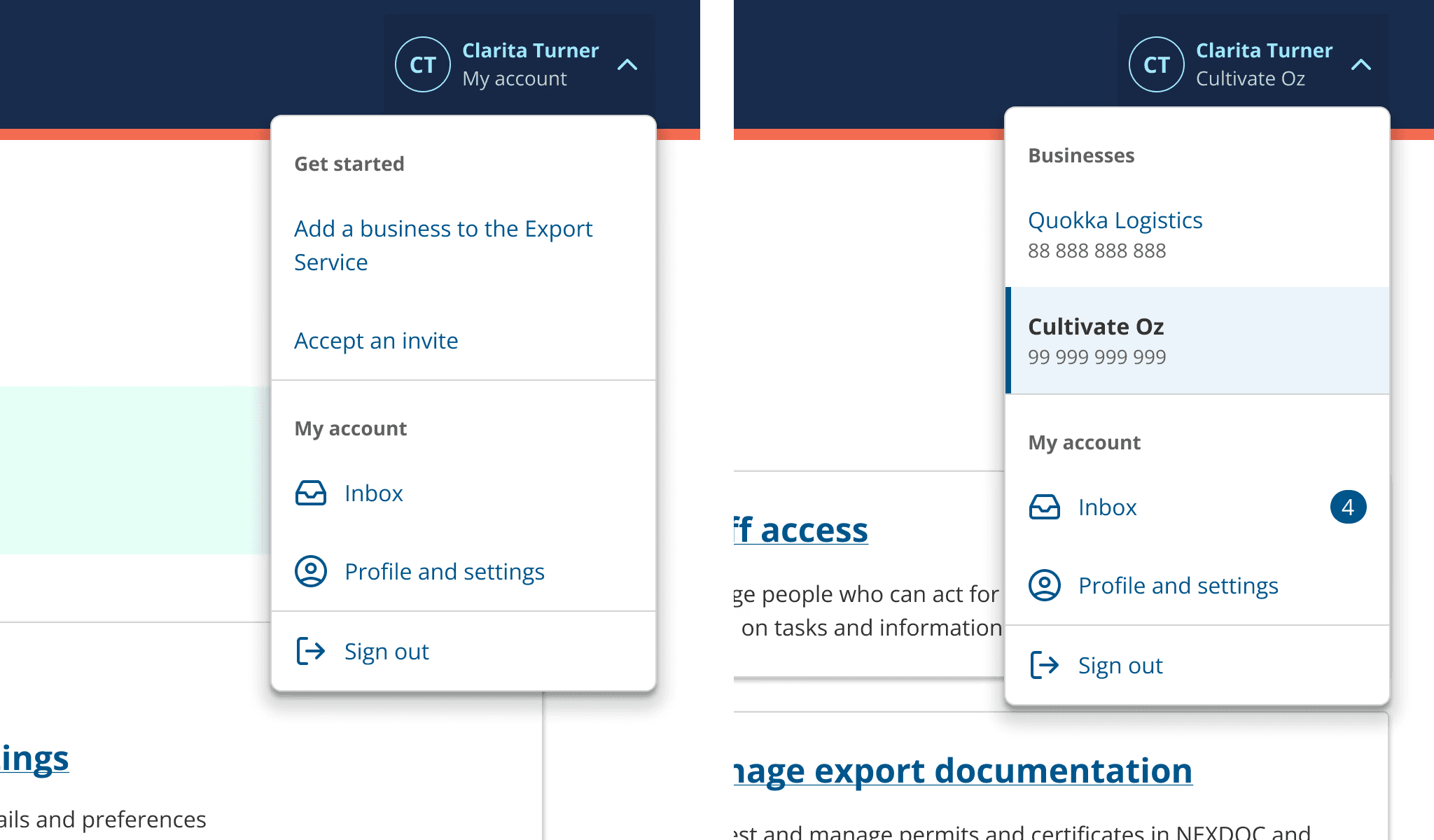
I designed a dropdown component that shows which business the user is acting on behalf of, accessible from persistent navigation across the platform. For single-business users, the switcher stays out of the way. For multi-business users, it's always within reach. Testing confirmed that surfacing the active business context reduced errors and gave users more confidence in their actions.

This component was contributed back to the Agriculture Design System and is now used across other areas of the department.

Navigation design showing business context switcher

Sign in with email

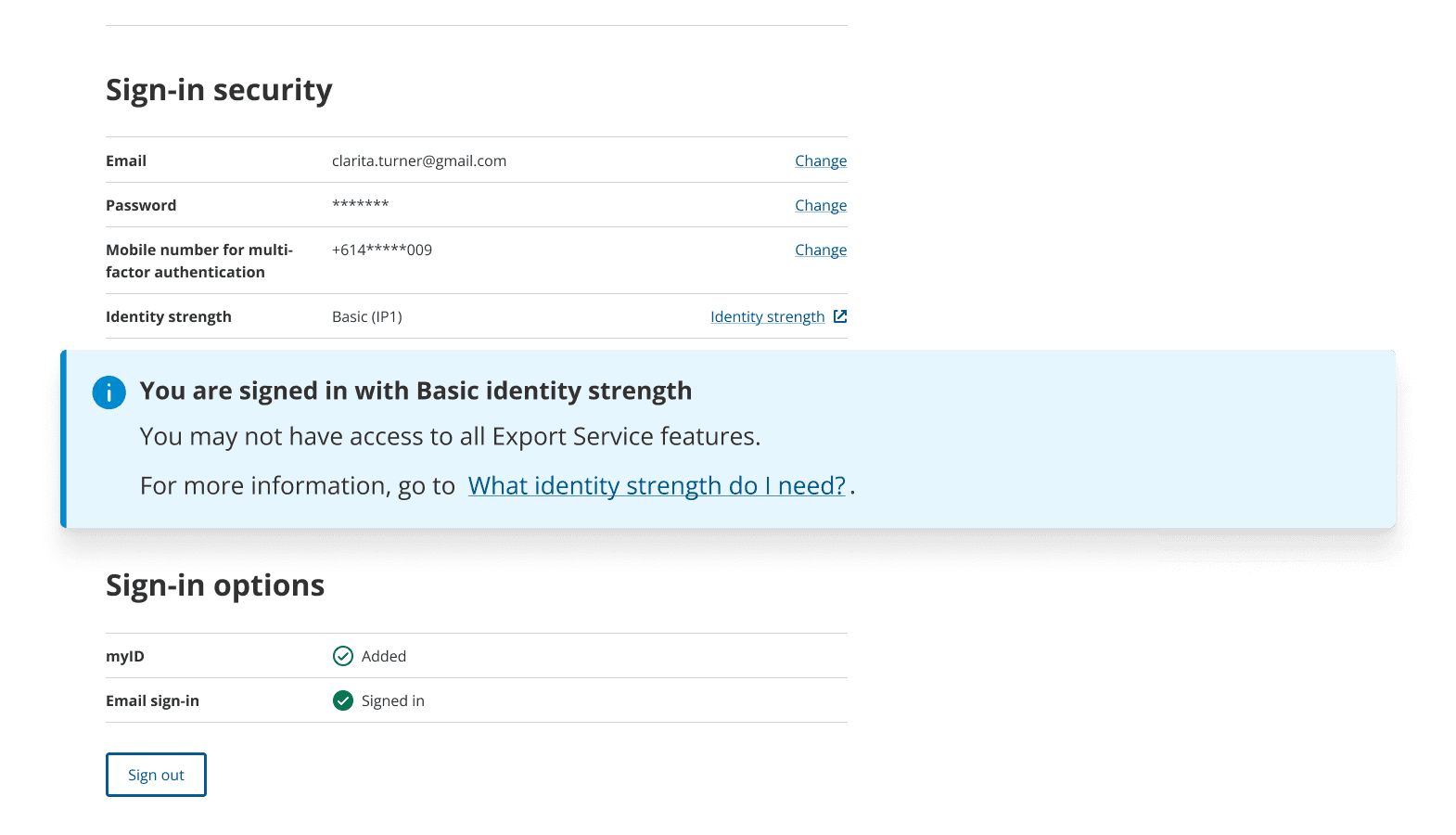
We expected most users to choose Digital ID since it offered fuller access to services. In testing, users reached for email sign-in first. It felt more familiar and less risky.

The problem was that both options sat side by side with no indication of what each unlocked. Users assumed they were equal. Rather than pushing users toward Digital ID, we redesigned the sign-in screen with clear callouts explaining what additional access Digital ID would provide. We also worked with content designers to create help articles that walked users through the difference.

Email sign-in interface with Digital ID callout

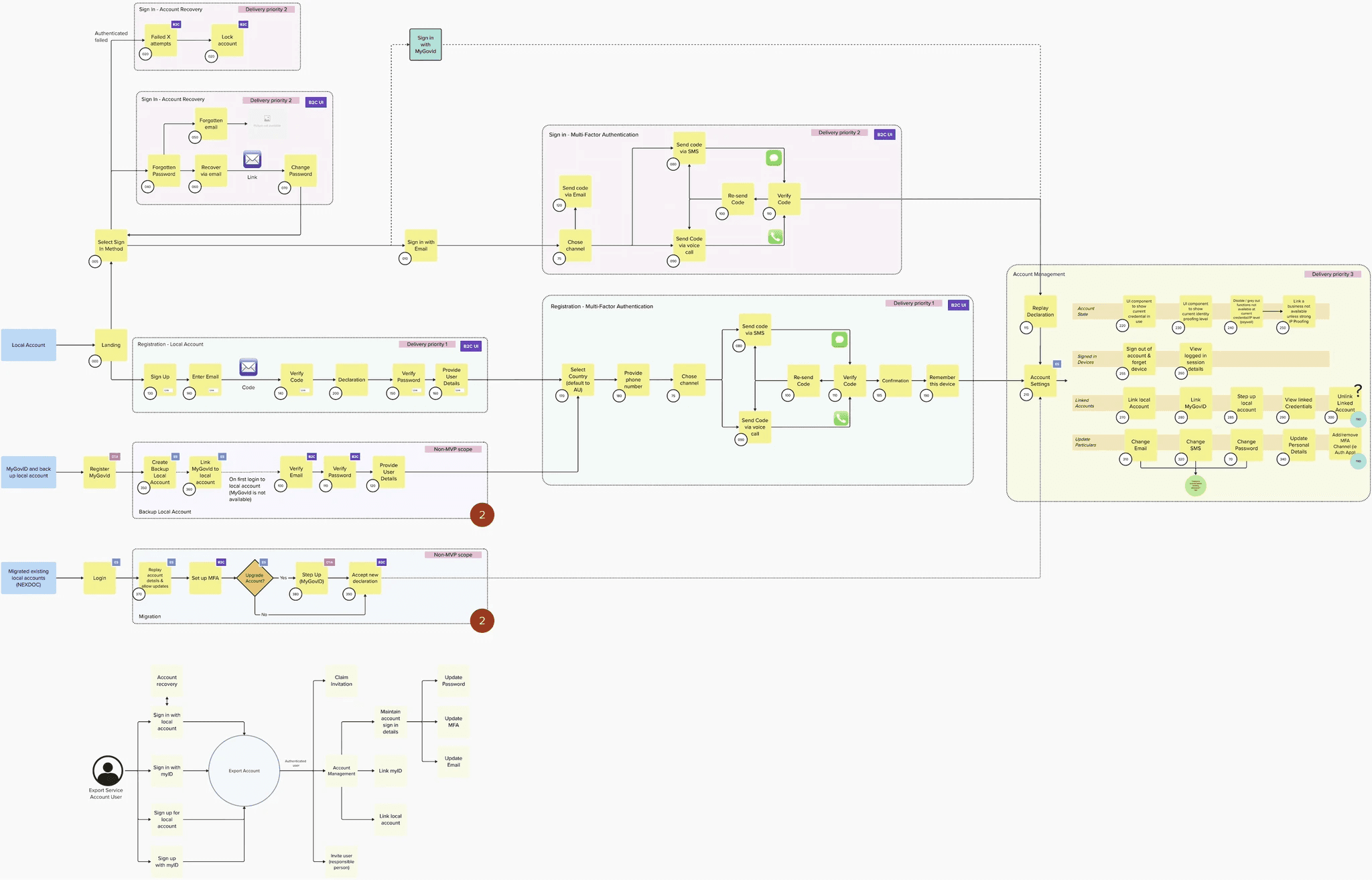
I translated the multi-factor authentication journey into screen designs, which were implemented using Microsoft Azure B2C (a white-label authentication solution).

Multi-factor authentication user journey map

Since we couldn't use the Design System's React UI library, the interface had to be built in HTML and CSS. I created detailed design documentation to guide development. The solution initially produced inconsistent layouts and elements, so I worked closely with developers, providing specific feedback to refine visual hierarchy, improve usability and strengthen accessibility.

Multi-factor authentication screen designs
Top

Designing for secure access

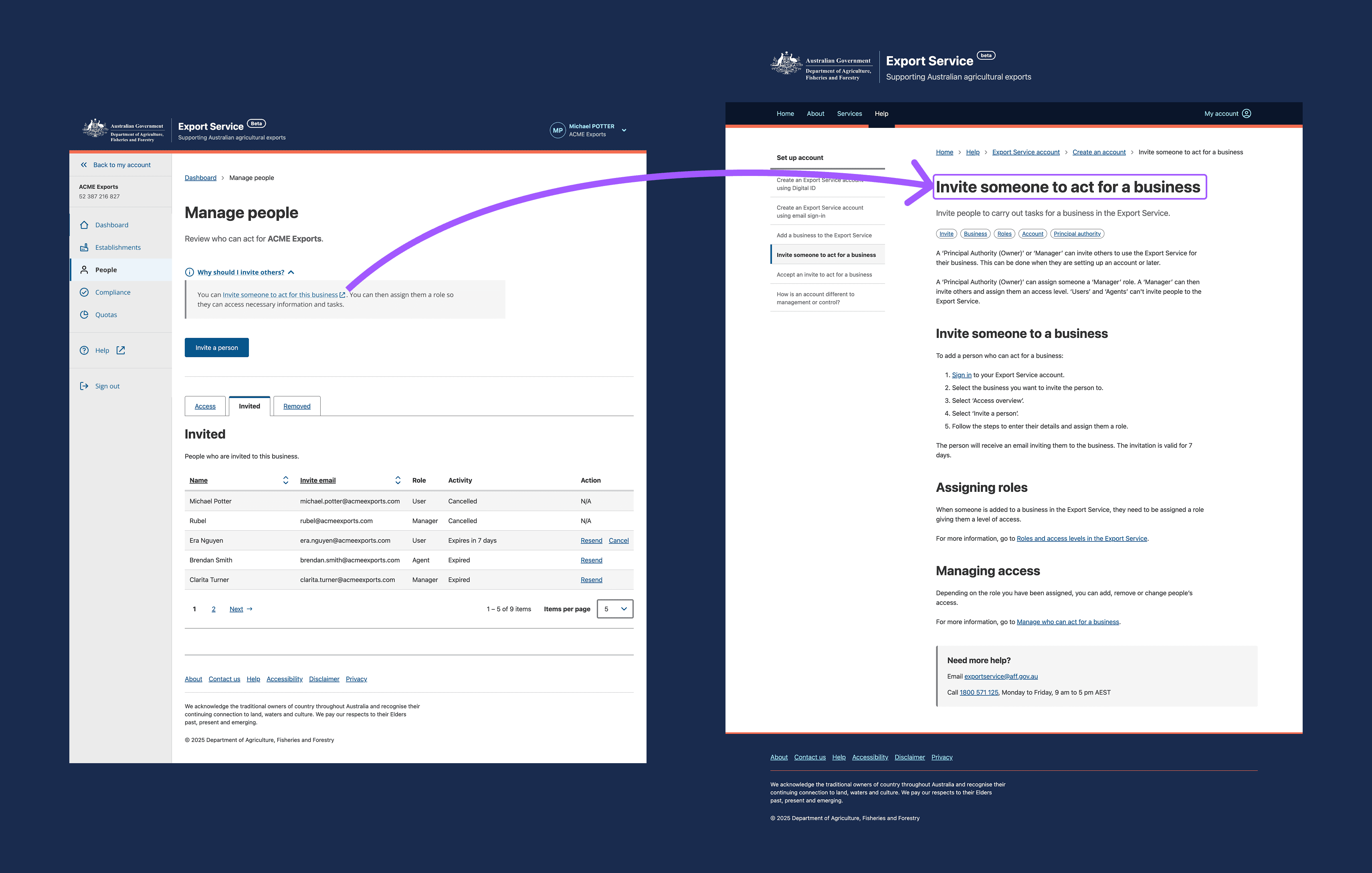
While onboarding, business managers needed a way to seamlessly verify their business while preventing unauthorised access. We introduced a task overview to set expectations and guide them through the verification process.

Other key user requirements:

  • Enter business details once and reuse them across the service.
  • Provide managers with simple controls for team permissions and access.
  • Enable users to manage multiple businesses or entities from a single account.
Business verification and linking interface

Content strategy

Clear guidance was critical to this project's success. Security requirements in regulatory environments are often frustrating and complex for users. By providing the right information at the right moment, we helped users understand that security controls are valuable business tools not just obstacles to government services.

I collaborated with content designers to create 20+ help articles that translated technical requirements into plain language.

Form validation and designing for errors

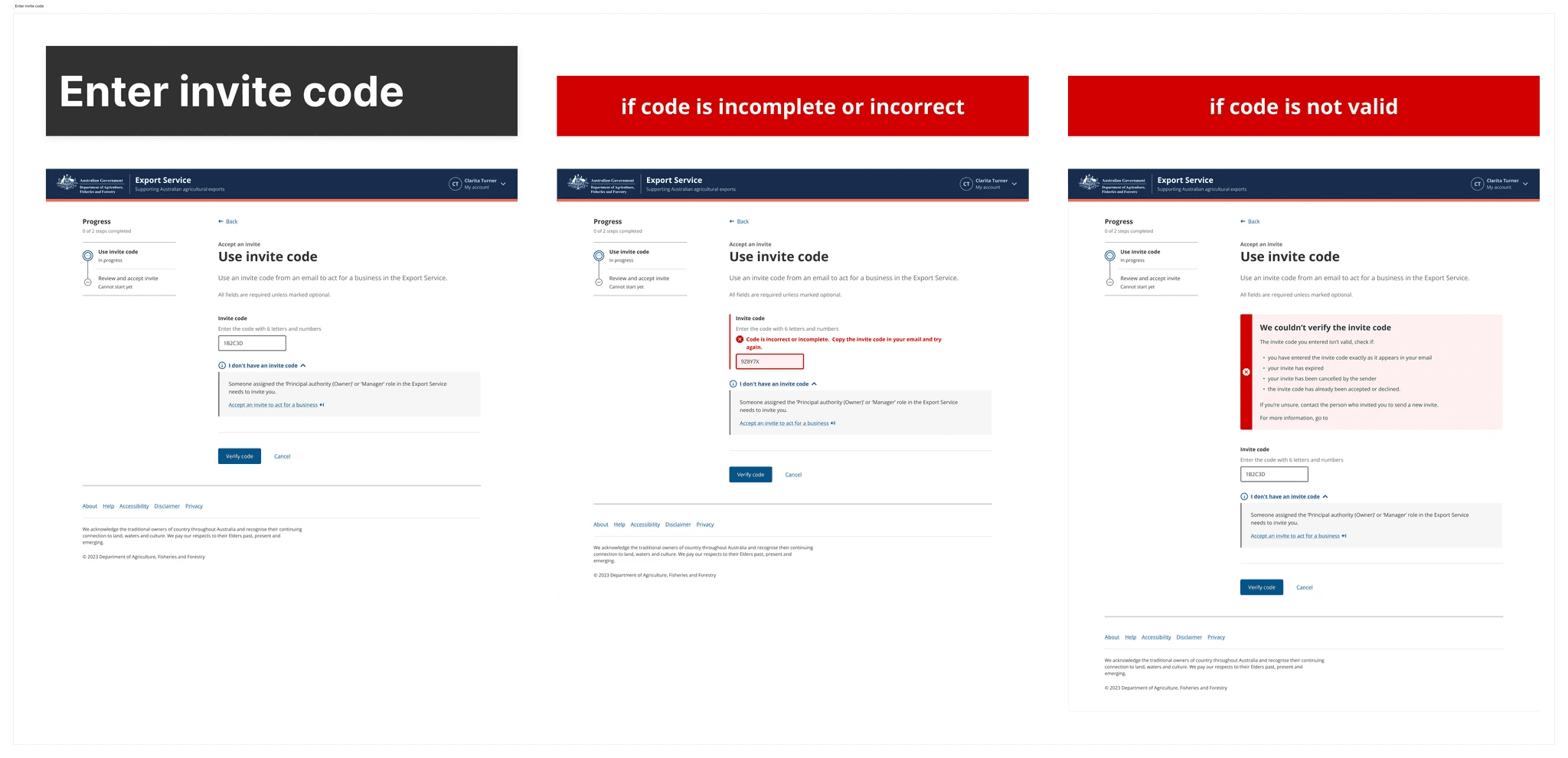
As a security requirement, invited users had to verify their invitation with an email code rather than a clickable link. Several issues could occur when redeeming a code: it might be expired, cancelled by the sender, or already used.

Error messages needed to strike a careful balance: general enough to avoid exposing system vulnerabilities to bad actors, while still being specific enough to help legitimate users resolve the issue.

Error message design for invitation codes

Error states fell into two categories: system-generated or user-generated. This classification informed how we wrote and displayed each message, ensuring we balanced security with helpful guidance.

Our front-end developers preferred having error state mockups positioned directly next to the main user flow designs in Figma. We also documented these rules and messages in detailed build tickets to support implementation and testing.

Top

Impact

Business impact

The Export Service now serves over 2,000 regulated businesses. Secure onboarding and access pathways reduced department processing by over 40% and registration times dropped from weeks to days.

Design influence

Navigation components I designed were adopted platform-wide. Several components I contributed to the Agriculture Design System are used by other areas of the department. Accessibility practices I introduced were picked up by the development team and applied to ongoing work.

Growth

When the Product Manager left the program, I stepped into the Experience Lead role, setting priorities and managing workflow across the 16-person delivery team. Over three years I went from Interaction Designer to leading the experience design function.

Top

Let's connect

I'm exploring new opportunities and would love to hear about what you're building.